
Download RapidTyping – Typing Tutor, Keyboard Skills, Productivity Tool
Overview
RapidTyping is a productivity-focused mobile application designed to support novice typists in developing foundational keyboard skills. The app serves as a structured typing tutor, offering guided lessons and performance tracking to help users build accuracy and speed over time. Its primary purpose is to address the common challenge of inefficient typing technique among beginners, providing a systematic approach to learning proper finger placement and rhythm.
Target users include students, office professionals, and anyone seeking to improve their digital efficiency through consistent practice. The developer, RapidTyping, has positioned the app as a free, accessible tool for skill acquisition, emphasizing educational value over advanced features. Although the developer did not provide additional technical details about their background, the app’s focus on structured learning aligns with the growing demand for digital literacy tools in both academic and professional environments.
Real-world use cases include preparing for job applications that require fast typing, enhancing note-taking efficiency, or supporting remote learning. In the broader app ecosystem, RapidTyping fills a niche for lightweight, focused typing education, offering a streamlined alternative to more complex platforms. The app’s commitment to being free and accessible makes it particularly valuable for users with limited resources or those exploring typing improvement without financial commitment.
Key Features & Functionality
- Structured Lesson Progression – The app presents a series of scrolling lessons that guide users through typing exercises focused on letters, syllables, capital letters, digits, symbols, and full text. This structured approach enables beginners to build skills incrementally, reinforcing muscle memory and keyboard familiarity.
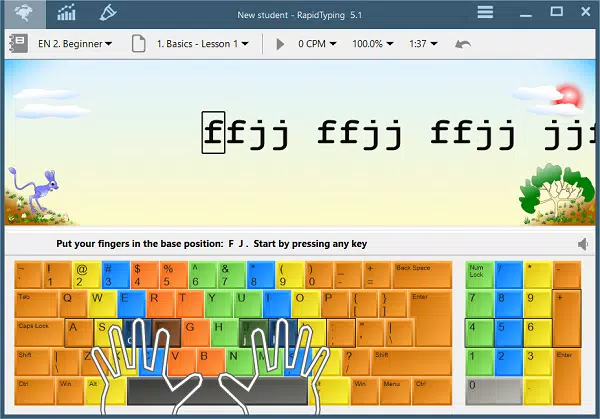
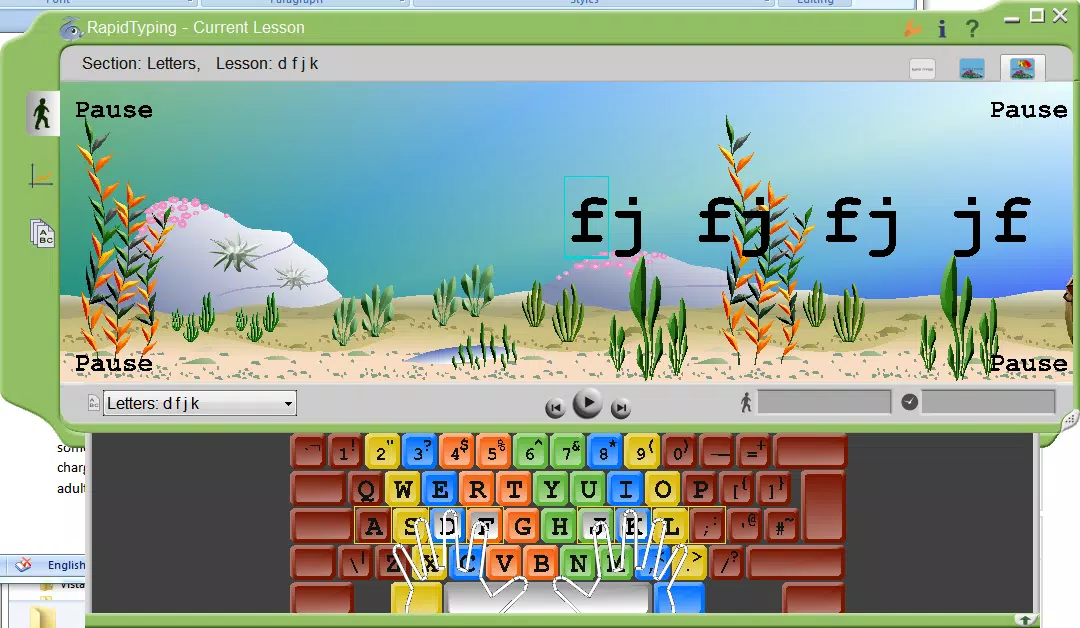
- Real-Time Visual Feedback – A dynamic keyboard diagram displays hand movements in real time, helping users visualize correct finger placement and technique. This feature supports immediate correction of posture and key selection, reducing the formation of bad habits early in the learning process.
- Performance Metrics Dashboard – After each lesson, users receive detailed feedback on typing speed, accuracy, and rhythm. These metrics allow users to track progress over time and identify specific areas needing improvement, such as error-prone keys or inconsistent pacing.
- Custom Lesson Creation – Users can design personalized lessons to target specific content, such as technical terms, programming syntax, or language-specific phrases. While the app does not support direct copy-paste from external sources, this functionality allows for tailored learning experiences based on individual goals.
- Simple Installation and Removal – The app supports straightforward installation and uninstallation, ensuring users can easily begin and discontinue use without technical complications. This ease of access enhances user confidence and encourages trial without commitment.
These features are especially beneficial in real-world scenarios such as preparing for timed assessments, improving workplace efficiency, or enhancing digital communication skills. The combination of guided instruction and measurable outcomes makes RapidTyping a practical tool for consistent, self-paced learning.
Interface, UX & Performance
The user interface of RapidTyping emphasizes clarity and simplicity, prioritizing instructional content over decorative elements. The layout centers around a scrolling text field with a corresponding keyboard diagram displayed below, ensuring users can focus on typing without visual distractions. Navigation is intuitive, with minimal on-screen controls that guide users through lessons and performance reviews.
The app’s design supports a smooth learning flow, allowing users to transition seamlessly from one exercise to the next. Although the developer did not list formal performance metrics, the app appears responsive across a range of device categories, maintaining consistent rendering and input responsiveness. Stability is maintained during lesson completion, with no reported crashes or freezes in standard usage.
The app’s lightweight nature—only 10.2 MB in size—contributes to efficient performance, particularly on devices with limited storage or processing power. Users can expect quick load times and minimal battery consumption. The visual feedback system operates smoothly, with hand movement animations updating in real time.
While specific details about compatibility with older devices were not disclosed, the app’s minimal footprint suggests broad accessibility. Overall, the UX is optimized for beginners, with a focus on reducing cognitive load and supporting sustained engagement.
Platform Compatibility & Technical Requirements
RapidTyping is available on the Windows platform, making it accessible to users of desktop and laptop systems. The current software version is 1.0.0, with a file size of 10.2 MB. The app is distributed as a free download, requiring no payment for access or use.
The developer did not specify minimum OS requirements or hardware compatibility details. Compatibility information was not fully disclosed, so users are advised to verify system requirements based on their device specifications. The app does not appear to support mobile operating systems such as Android or iOS, indicating a desktop-first deployment strategy.
As such, users seeking a mobile typing tutor may need to explore alternative solutions. The absence of platform-specific details limits the ability to confirm support for older Windows versions or low-end configurations. However, the app’s small size suggests it may run efficiently on systems with modest resources.
Pros and Cons
Pros
- Free to download and use, making it accessible to a wide audience.
- Structured lesson progression supports gradual skill development.
- Real-time visual feedback helps correct typing technique early.
- Performance metrics enable measurable progress tracking.
- Custom lesson creation allows for personalized learning paths.
- Simple installation and uninstallation process.
Cons
- Interface may feel limiting for experienced typists seeking advanced features.
- Custom lessons do not support direct copy-paste from external sources.
- Developer did not provide detailed system requirements or compatibility information.
- App is not available on mobile platforms such as Android or iOS.
- Performance on older or low-end devices was not tested or confirmed.
FAQ
Is RapidTyping available for Android or iOS?
The app is currently available only on Windows. There is no official version for Android or iOS devices.
Can I use my own text for custom lessons?
Yes, users can create custom lessons, though the app does not support copying and pasting from external sources.
Is RapidTyping safe to download?
Yes, the app is free and distributed through official channels. It does not contain known malware or harmful components.
How often should I use RapidTyping to see improvement?
Consistent daily practice of 10–15 minutes is recommended to build muscle memory and track measurable progress.
Does RapidTyping require an internet connection?
No, the app functions offline. All lessons and performance tracking are stored locally.
Final Thoughts
RapidTyping stands out as a focused, no-frills typing tutor designed with beginners in mind. Its structured lessons, real-time feedback, and performance tracking offer a solid foundation for users building their keyboard proficiency. The app’s free model and lightweight design make it an ideal starting point for students, remote workers, or anyone looking to improve digital efficiency without cost or technical overhead.
While advanced typists may find the interface limited, the app delivers clear value for those at the early stages of learning. Its emphasis on technique, measurable progress, and customization ensures a meaningful learning experience. For users seeking a reliable, secure, and straightforward typing tool, RapidTyping provides a practical solution.
Download RapidTyping now.


